 Vize
textarea-autosize
Grow a textarea to fit its content.
| Package | @vizejs/composable/textarea-autosize |
| Own the source | vize lib pull composable:textarea-autosize |
| Runtime exports | useTextareaAutosize |
| Gzip budget | 3328 B |
Minimal setup
Use a Vue 3.5+ project with Vue SFC compilation configured (see Vite+ integration).
vp install @vizejs/composable
Import the entry directly. Call lifecycle-bound utilities inside <script setup> so cleanup follows the component scope; consult the runtime contract for this entry's SSR and hydration behavior.
import { useTextareaAutosize } from "@vizejs/composable/textarea-autosize";
Try it
Write a release note in a growing editor
Keep a multiline draft readable as it grows, without losing the editing position when the available width changes.
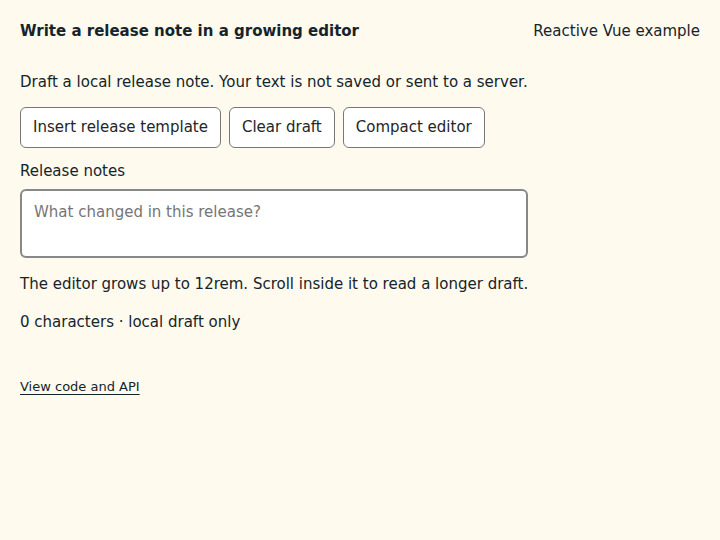
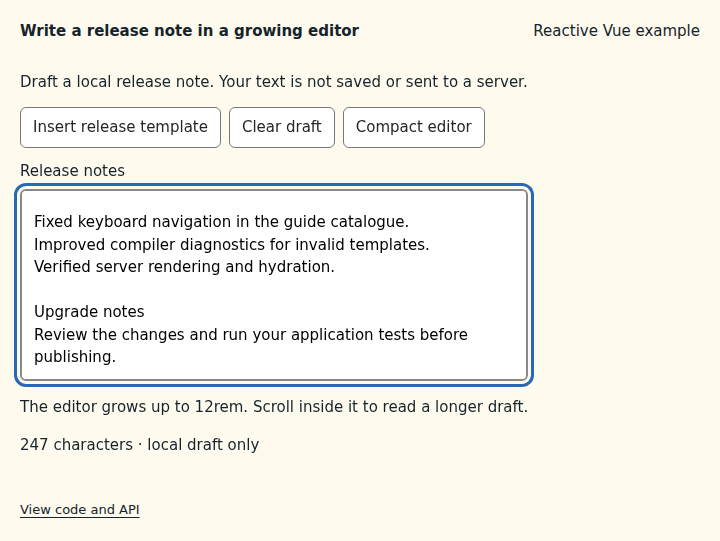
What to observe: Type several lines or insert the release template. The editor grows with the text; Compact editor changes the wrapping and the height automatically. Clear draft returns to two rows. Long drafts scroll inside the editor once it reaches 12rem.
The draft stays in memory and is never saved or submitted. Bind the returned input ref with v-model and pass a template ref for the native textarea. The default height mode allows the example's CSS max-height to cap the editor; min-height is a separate minimum-sizing mode and can override a smaller CSS maximum. Padding and borders are included correctly for either box-sizing value. Programmatic changes are measured after Vue updates the textarea, and real width changes are observed automatically. Server markup keeps the declared rows; measurement and the ResizeObserver belong to the component scope. The package remains experimental.
Compare the initial and interacted states
Copy the example
Save this complete SFC in your Vue project. Its public imports and source are the same ones executed in the preview.
<script setup lang="ts">
import { ref, useId, useTemplateRef } from "vue";
import { useTextareaAutosize } from "@vizejs/composable/textarea-autosize";

const draftId = useId();
const hintId = useId();
const compact = ref(false);
const draft = useTemplateRef<HTMLTextAreaElement>("draft");
const { input } = useTextareaAutosize(draft, { input: ref("") });

function insertTemplate(): void {
  input.value = [
    "Release highlights",
    "",
    "Fixed keyboard navigation in the guide catalogue.",
    "Improved compiler diagnostics for invalid templates.",
    "Verified server rendering and hydration.",
    "",
    "Upgrade notes",
    "Review the changes and run your application tests before publishing.",
  ].join("\n");
}
</script>

<template>
  <div class="composable-example">
    <p>Draft a local release note. Your text is not saved or sent to a server.</p>
    <div class="example-actions">
      <button type="button" @click="insertTemplate">Insert release template</button>
      <button type="button" @click="() => (input = '')">Clear draft</button>
      <button type="button" :aria-pressed="compact" @click="() => (compact = !compact)">
        Compact editor
      </button>
    </div>
    <div class="editor" :class="{ compact }">
      <label :for="draftId">Release notes</label>
      <textarea
        :id="draftId"
        ref="draft"
        v-model="input"
        :aria-describedby="hintId"
        rows="2"
        placeholder="What changed in this release?"
      />
      <p :id="hintId">The editor grows up to 12rem. Scroll inside it to read a longer draft.</p>
    </div>
    <output aria-live="polite">{{ input.length }} characters · local draft only</output>
  </div>
</template>

<style scoped>
.editor {
  width: 100%;
  max-width: 32rem;
  &.compact {
    max-width: 15rem;
  }
  & label {
    display: block;
    margin-bottom: 6px;
  }
  & textarea {
    box-sizing: border-box;
    display: block;
    width: 100%;
    max-height: 12rem;
    padding: 10px 12px;
    border: 2px solid #888;
    border-radius: 6px;
    font: inherit;
    line-height: 1.5;
    overflow-y: auto;
    resize: none;
  }
}
</style>
Runtime contract
| Utility | Category | Stability | SSR | Hydration | Cleanup | Targets | Host globals | Uses |
|---|---|---|---|---|---|---|---|---|
useTextareaAutosize |
dom | experimental | deterministic-fallback | stable | reactive-scope | web, desktop | globalThis, ResizeObserver |
resolveElement, useResizeObserver, tryOnScopeDispose |
API
useTextareaAutosize
Grow a textarea to fit its content. On each input change (and when the element width changes), the style property is reset to auto, and scrollHeight is adjusted for the element's padding, borders and box sizing before writing the CSS height in pixels. Nothing is measured during server rendering; markup keeps its declared rows.
function useTextareaAutosize( target: MaybeElementTarget, options: UseTextareaAutosizeOptions = {}, ): TextareaAutosizeControls
Types
UseTextareaAutosizeOptions
Options for useTextareaAutosize.
| Member | Type | Description |
|---|---|---|
input? |
Ref<string> |
Text bound to the textarea. Changes trigger a resize. A fresh ref is created when omitted. |
styleProp? |
TextareaAutosizeStyleProperty |
Style property written with the measured height. |
onResize? |
(height: number) => void |
Called after each resize with the new height. |
host? |
MaybeRefOrGetter<ResizeObserverHost | null | undefined> |
Resize-observer capability used to re-measure when the width changes. |
TextareaAutosizeControls
State returned by useTextareaAutosize.
| Member | Type | Description |
|---|---|---|
input |
Ref<string> |
Text bound to the textarea (use with v-model). |
triggerResize |
() => void |
Re-measure immediately. |