 Vize
virtual-list
Render only the visible slice of a long list (fixed or variable item sizes).
| Package | @vizejs/composable/virtual-list |
| Own the source | vize lib pull composable:virtual-list |
| Runtime exports | useVirtualList |
| Gzip budget | 4352 B |
Minimal setup
Use a Vue 3.5+ project with Vue SFC compilation configured (see Vite+ integration).
vp install @vizejs/composable
Import the entry directly. Call lifecycle-bound utilities inside <script setup> so cleanup follows the component scope; consult the runtime contract for this entry's SSR and hydration behavior.
import { useVirtualList } from "@vizejs/composable/virtual-list";
Try it
Browse a thousand guides
Keep a long, searchable catalogue responsive by rendering only the rows near its visible area.
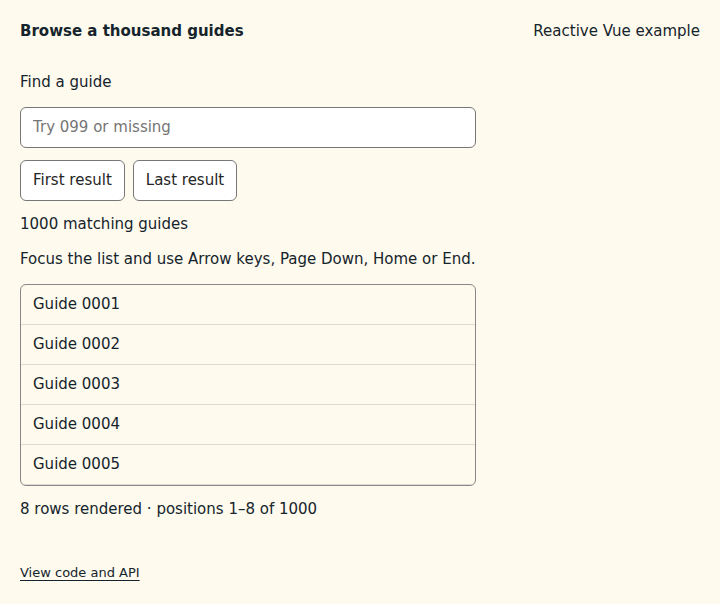
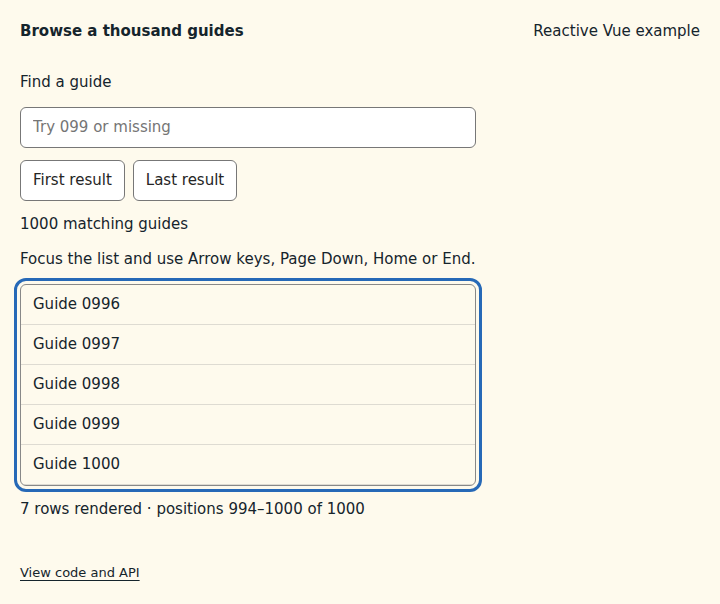
What to observe: Focus the list and use Page Down, Home or End, or activate Last result. The rendered positions move through 1,000 guides while only a few rows exist at once. Search for 099 to see eleven matches, then try missing for the empty state. Searching returns to the first match without moving focus from the input.
The complete example uses local sample data, not a server request. Each row must occupy exactly the declared 40 CSS pixels, including padding and borders. overscan: 2 keeps two additional rows on either side; the container's 200px height determines the visible area. Bind containerProps to the scroll region and wrapperProps.style to its inner list, then render list rather than the entire source. scrollTo() takes a zero-based position in the filtered list. The first seven rows render on the server; measurement and scroll tracking belong to the component scope. Only currently rendered rows are available to browser Find and screen readers. Position and total-count attributes describe them, but do not make the other rows available: use search to narrow the catalogue, and prefer pagination or a complete list when every item must be readable or contain focusable controls.
Compare the initial and interacted states
Copy the example
Save this complete SFC in your Vue project. Its public imports and source are the same ones executed in the preview.
<script setup lang="ts">
import { computed, ref, useId, watch } from "vue";
import { useVirtualList } from "@vizejs/composable/virtual-list";

const query = ref("");
const searchId = useId();
const scrollHelpId = useId();
const guides = Array.from({ length: 1_000 }, (_, index) => ({
  id: index + 1,
  title: `Guide ${String(index + 1).padStart(4, "0")}`,
}));
const matches = computed(() =>
  guides.filter((guide) => guide.title.toLowerCase().includes(query.value.trim().toLowerCase())),
);
const { list, containerProps, wrapperProps, scrollTo } = useVirtualList(matches, {
  itemSize: 40,
  overscan: 2,
  initialItemCount: 7,
});
// A new search starts at its first result, without moving keyboard focus.
watch(query, () => scrollTo(0), { flush: "post" });
</script>

<template>
  <div class="composable-example">
    <label :for="searchId">Find a guide</label>
    <input :id="searchId" v-model="query" type="search" placeholder="Try 099 or missing" />
    <div class="example-actions">
      <button type="button" :disabled="matches.length === 0" @click="() => scrollTo(0)">
        First result
      </button>
      <button
        type="button"
        :disabled="matches.length === 0"
        @click="() => scrollTo(matches.length - 1)"
      >
        Last result
      </button>
    </div>
    <output aria-live="polite">{{ matches.length }} matching guides</output>
    <p :id="scrollHelpId">Focus the list and use Arrow keys, Page Down, Home or End.</p>
    <div
      v-bind="containerProps"
      role="region"
      aria-label="Guide catalogue"
      :aria-describedby="scrollHelpId"
      tabindex="0"
      class="guide-catalogue"
    >
      <div v-bind="wrapperProps" role="list" aria-label="Matching guides">
        <div
          v-for="row in list"
          :key="row.data.id"
          role="listitem"
          :aria-posinset="row.index + 1"
          :aria-setsize="matches.length"
          class="guide-row"
        >
          {{ row.data.title }}
        </div>
      </div>
    </div>
    <p v-if="matches.length === 0">No guides match. Try a different search.</p>
    <p v-else>
      {{ list.length }} rows rendered · positions {{ (list[0]?.index ?? 0) + 1 }}–{{
        (list.at(-1)?.index ?? 0) + 1
      }}
      of {{ matches.length }}
    </p>
  </div>
</template>

<style scoped>
.guide-catalogue {
  height: 200px;
  border: 1px solid #888;
  border-radius: 6px;
}
.guide-row {
  height: 40px;
  box-sizing: border-box;
  padding: 8px 12px;
  border-bottom: 1px solid #8884;
}
</style>
Runtime contract
| Utility | Category | Stability | SSR | Hydration | Cleanup | Targets | Host globals | Uses |
|---|---|---|---|---|---|---|---|---|
useVirtualList |
dom | experimental | deterministic-fallback | stable | reactive-scope | web, desktop | globalThis, ResizeObserver |
useElementRef, useResizeObserver |
API
useVirtualList
Render only the visible slice of a long list (fixed or variable item sizes). Offsets are prefix sums recomputed when the items change; the visible range is found by binary search, so scrolling is O(log n). Until the container is measured (always on the server) the first initialItemCount items render, so server and first client render match. The container is measured on scroll and via ResizeObserver, released with the owning reactive scope.
function useVirtualList<Item>( items: MaybeRefOrGetter<readonly Item[]>, options: UseVirtualListOptions<Item>, ): VirtualListControls<Item>
Types
UseVirtualListOptions
Options for useVirtualList.
| Member | Type | Description |
|---|---|---|
itemSize |
VirtualItemSize<Item> |
Item size along the scroll axis. |
overscan? |
number |
Extra items rendered before and after the visible range. |
orientation? |
VirtualListOrientation |
Scroll axis. |
initialItemCount? |
number |
Items rendered before the container is measured (every server render). Keeps SSR output deterministic and non-empty for crawlers. |
host? |
MaybeRefOrGetter<ResizeObserverHost | null | undefined> |
Resize-observer capability used to measure the container. |
VirtualListItem
One rendered row/column of useVirtualList.
| Member | Type | Description |
|---|---|---|
data |
Item |
Source item. |
index |
number |
Index in the source list. |
offset |
number |
Start offset along the scroll axis. |
size |
number |
Size along the scroll axis. |
VirtualContainerStyle
Inline style for the scroll container.
| Member | Type | Description |
|---|---|---|
overflowY |
"auto" | "hidden" |
Vertical overflow. |
overflowX |
"auto" | "hidden" |
Horizontal overflow. |
VirtualWrapperStyle
Inline style for the inner wrapper that holds the rendered items.
| Member | Type | Description |
|---|---|---|
width |
string |
Wrapper width. |
height |
string |
Wrapper height. |
marginTop |
string |
Leading offset (margin-top or margin-left). |
marginLeft |
string |
Leading offset for horizontal lists. |
display |
"block" | "flex" |
Horizontal lists lay items out in a row. |
VirtualListControls
State and bindings returned by useVirtualList.
| Member | Type | Description |
|---|---|---|
list |
ComputedRef<readonly VirtualListItem<Item>[]> |
Items to render. |
totalSize |
ComputedRef<number> |
Total content size along the scroll axis. |
containerProps |
{ readonly ref: ElementRefSetter; readonly onScroll: () => void; readonly style: VirtualContainerStyle; } |
Bind on the scroll container: v-bind="containerProps". |
wrapperProps |
ComputedRef<{ readonly style: VirtualWrapperStyle }> |
Bind on the inner wrapper: v-bind="wrapperProps". |
scrollTo |
(index: number) => void |
Scroll so that the item at index starts at the container edge. |