 Vize
use-segmenter
Split text into graphemes, words, or sentences with Intl.Segmenter.
| Package | @vizejs/composable/use-segmenter |
| Own the source | vize lib pull composable:use-segmenter |
| Runtime exports | useSegmenter |
| Gzip budget | 2816 B |
Minimal setup
Use a Vue 3.5+ project with Vue SFC compilation configured (see Vite+ integration).
vp install @vizejs/composable
Import the entry directly. Call lifecycle-bound utilities inside <script setup> so cleanup follows the component scope; consult the runtime contract for this entry's SSR and hydration behavior.
import { useSegmenter } from "@vizejs/composable/use-segmenter";
Try it
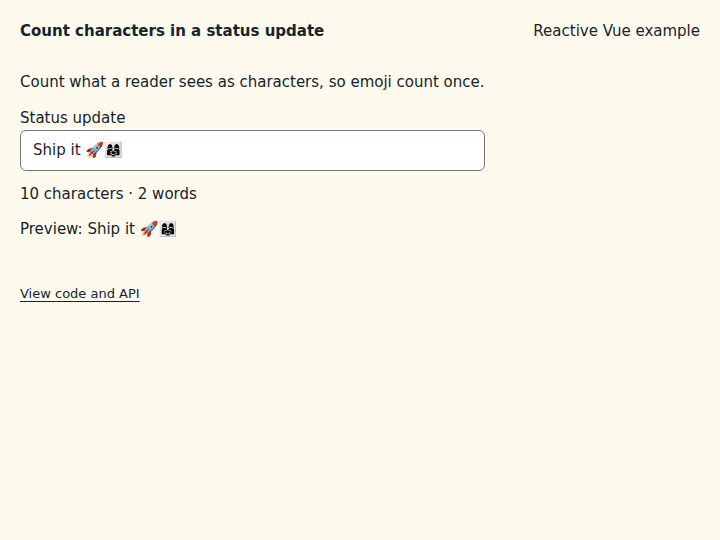
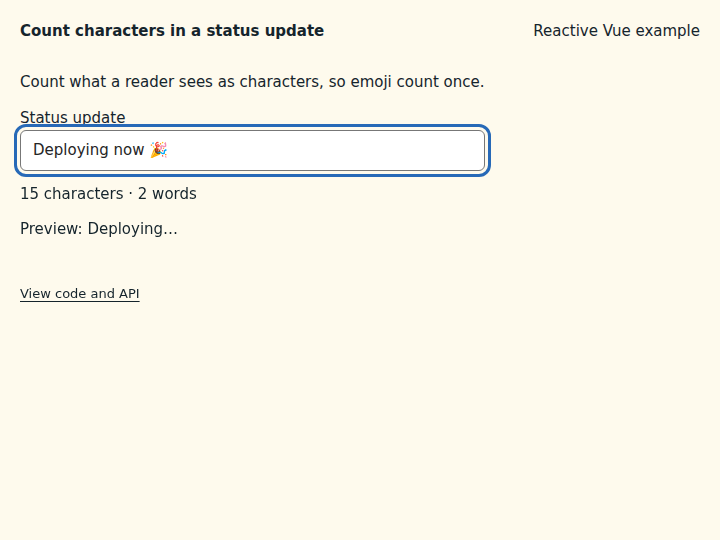
Count characters in a status update
Count and truncate text by the characters a reader sees, so an emoji sequence counts as one.
What to observe: Ship it 🚀👩👩👧 counts 10 characters even though the family emoji is several code points. The preview truncates to ten characters without splitting an emoji.
Use granularity: "word" or "sentence" to segment differently. wordCount counts word-like segments only.
Compare the initial and interacted states
Copy the example
Save this complete SFC in your Vue project. Its public imports and source are the same ones executed in the preview.
<script setup lang="ts">
import { ref } from "vue";
import { useSegmenter } from "@vizejs/composable/use-segmenter";
const text = ref("Ship it 🚀👩👩👧");
const { graphemeCount, wordCount, truncate } = useSegmenter(text, { granularity: "grapheme" });
</script>
<template>
<div class="composable-example">
<p>Count what a reader sees as characters, so emoji count once.</p>
<label>
Status update
<input v-model="text" />
</label>
<output aria-live="polite">{{ graphemeCount }} characters · {{ wordCount }} words</output>
<p>Preview: {{ truncate(10) }}</p>
</div>
</template>
Runtime contract
| Utility | Category | Stability | SSR | Hydration | Cleanup | Targets | Host globals | Uses |
|---|---|---|---|---|---|---|---|---|
useSegmenter |
i18n | experimental | deterministic-fallback | caller-managed | none | web, server, worker, native, desktop, terminal | Intl, window |
useLocale |
API
useSegmenter
Split text into graphemes, words, or sentences with Intl.Segmenter. Counts reflect what users perceive: "👨👩👧" is one grapheme, and word counts skip spaces and punctuation while handling languages without spaces (Japanese, Thai) through the locale. truncate shortens text without splitting clusters. Derived state only; deterministic during server rendering when the locale is explicit.
function useSegmenter( text: MaybeRefOrGetter<string>, options: MaybeRefOrGetter<UseSegmenterOptions> = {}, ): SegmenterControls
const { graphemeCount, truncate } = useSegmenter(bio, { locale: "en" });
const remaining = computed(() => 160 - graphemeCount.value);
Types
TextSegment
One segment of the text.
| Member | Type | Description |
|---|---|---|
segment |
string |
Segment text. |
index |
number |
UTF-16 code-unit offset of the segment in the source text. |
isWordLike |
boolean |
Word granularity: whether the segment is a word (not spaces or punctuation). |
UseSegmenterOptions
Options for useSegmenter.
| Member | Type | Description |
|---|---|---|
granularity? |
SegmenterGranularity |
Segmentation unit exposed through segments and count. |
locale? |
string | Intl.Locale |
Locale whose segmentation rules are used (word boundaries in Japanese or Thai depend on it). Pass it explicitly for hydration-stable output. |
SegmenterControls
Reactive segmentation returned by useSegmenter.
| Member | Type | Description |
|---|---|---|
locale |
ComputedRef<string> |
Canonical locale in use. |
segments |
ComputedRef<readonly TextSegment[]> |
Segments at the configured granularity. |
count |
ComputedRef<number> |
Number of segments at the configured granularity. |
graphemeCount |
ComputedRef<number> |
User-perceived characters (grapheme clusters), independent of granularity. |
wordCount |
ComputedRef<number> |
Word-like segments, independent of granularity. |
truncate |
(maxGraphemes: number, ellipsis?: string) => string |
Truncate the text to at most maxGraphemes user-perceived characters, never splitting an emoji or combining sequence. |