 Vize
use-number-format
Format numbers reactively with Intl.NumberFormat.
| Package | @vizejs/composable/use-number-format |
| Own the source | vize lib pull composable:use-number-format |
| Runtime exports | useNumberFormat |
| Gzip budget | 2560 B |
Minimal setup
Use a Vue 3.5+ project with Vue SFC compilation configured (see Vite+ integration).
vp install @vizejs/composable
Import the entry directly. Call lifecycle-bound utilities inside <script setup> so cleanup follows the component scope; consult the runtime contract for this entry's SSR and hydration behavior.
import { useNumberFormat } from "@vizejs/composable/use-number-format";
Try it
Show an order total in the reader's format
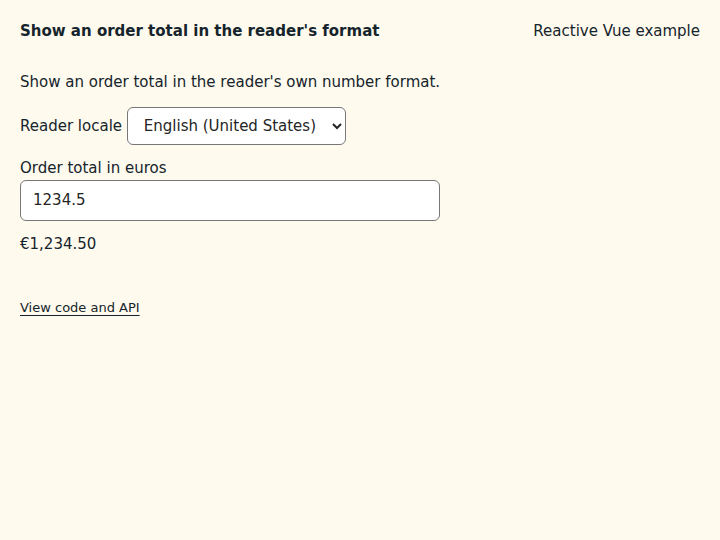
Format a currency amount with the separators, symbol position, and decimals a reader expects in their locale.
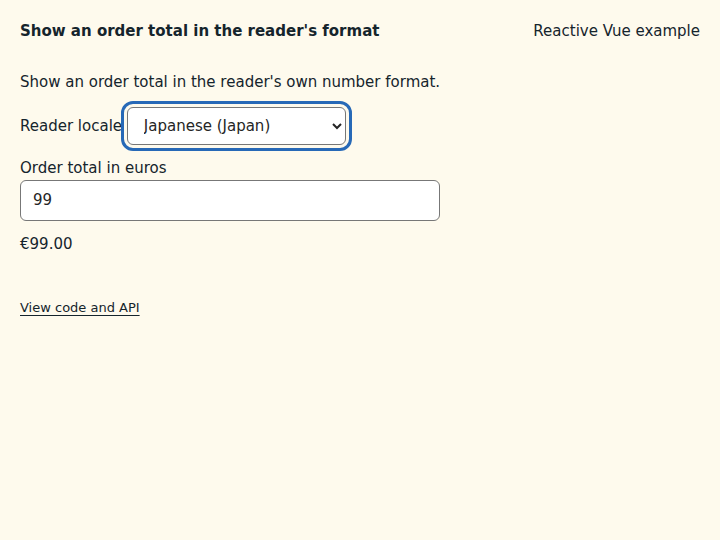
What to observe: The total starts as €1,234.50. Choose German (Germany) to see 1.234,50 €, then change the amount to 99 to see 99,00 €. Japanese (Japan) keeps the euro symbol in front.
options is a computed ref, so changing the locale rebuilds the cached Intl.NumberFormat. Pass locale explicitly when rendering on the server; without it the browser language is detected and hydration can differ.
Compare the initial and interacted states
Copy the example
Save this complete SFC in your Vue project. Its public imports and source are the same ones executed in the preview.
<script setup lang="ts">
import { computed, ref } from "vue";
import { useNumberFormat } from "@vizejs/composable/use-number-format";

const locale = ref("en-US");
const total = ref(1234.5);
const options = computed(() => ({
  locale: locale.value,
  style: "currency" as const,
  currency: "EUR",
}));
const { formatted } = useNumberFormat(total, options);
</script>

<template>
  <div class="composable-example">
    <p>Show an order total in the reader's own number format.</p>
    <label>
      Reader locale
      <select v-model="locale">
        <option value="en-US">English (United States)</option>
        <option value="de-DE">German (Germany)</option>
        <option value="ja-JP">Japanese (Japan)</option>
      </select>
    </label>
    <label>
      Order total in euros
      <input v-model.number="total" type="number" min="0" step="0.01" />
    </label>
    <output aria-live="polite">{{ formatted }}</output>
  </div>
</template>
Runtime contract
| Utility | Category | Stability | SSR | Hydration | Cleanup | Targets | Host globals | Uses |
|---|---|---|---|---|---|---|---|---|
useNumberFormat |
i18n | experimental | deterministic-fallback | caller-managed | none | web, server, worker, native, desktop, terminal | Intl, window |
useLocale |
API
useNumberFormat
Format numbers reactively with Intl.NumberFormat. The formatter follows the reactive options (including locale) and is cached per locale and option set through useLocale. Without an explicit locale the browser language is used, falling back to "en" (always the case on the server). Invalid options surface as the platform's RangeError/TypeError on first read. No listeners or timers are created, so nothing needs cleanup.
function useNumberFormat( value?: MaybeRefOrGetter<FormattableNumber | null | undefined>, options: MaybeRefOrGetter<UseNumberFormatOptions> = {}, ): NumberFormatControls
const price = ref(1234.5);
const { formatted } = useNumberFormat(price, { locale: "de-DE", style: "currency", currency: "EUR" });
formatted.value; // "1.234,50 €"
Types
UseNumberFormatOptions
Options for useNumberFormat.
| Member | Type | Description |
|---|---|---|
locale? |
string | Intl.Locale |
Locale used for formatting. Pass it explicitly for server rendering: without it the server falls back to "en" while the browser detects navigator.language, which can make hydration mismatch. |
NumberFormatControls
Reactive number formatting returned by useNumberFormat.
| Member | Type | Description |
|---|---|---|
locale |
ComputedRef<string> |
Canonical locale in use. |
formatter |
ComputedRef<Intl.NumberFormat> |
Cached formatter for the current locale and options. |
formatted |
ComputedRef<string> |
Formatted value, or "" while the value is null/undefined. |
format |
(value: FormattableNumber) => string |
Format any number with the current formatter. |
formatToParts |
(value: FormattableNumber) => Intl.NumberFormatPart[] |
Format any number into locale-aware parts. |
formatRange |
(start: FormattableNumber, end: FormattableNumber) => string |
Format a numeric range (for example "3–5"). |