 Vize
Musea
Warning
Musea is still evolving. File formats, APIs, and UI behavior may change.
Musea is a component gallery for listing your components and comparing their states. Try the
ready-made UI examples, then write variants of your own components in *.art.vue
files using plain Vue syntax.
| Goal | Feature |
|---|---|
| Compare default, loading, disabled, and error states | Art files with named variants |
| Check props and design tokens | The gallery's props palette and token view |
| Catch visual changes and accessibility problems | musea-vrt in CI |
vize_museais the Rust core: it parses*.art.vue, generates docs and prop palettes, autogenerates variants, and prepares VRT data.@vizejs/vite-plugin-museais the recommended gallery and dev-server workflow today.musea-vrtprovides visual regression snapshots, a11y audits, approvals, cleanup, and generated art files.
Overview
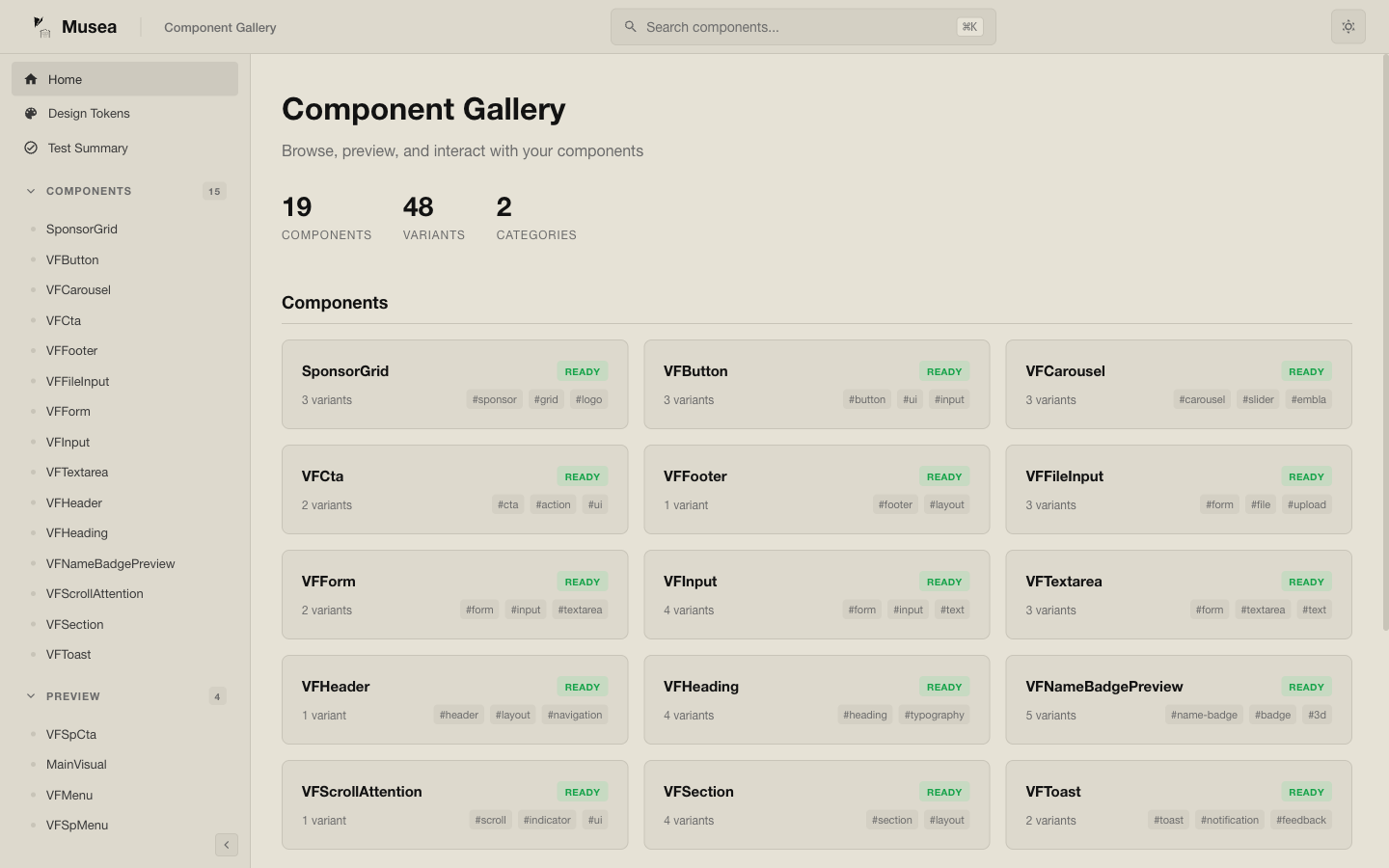
Musea uses *.art.vue files to describe component variants with Vue-native syntax.
Installation
Install vp once from the Vite+ install guide, then add the package:
vp install -D @vizejs/vite-plugin @vizejs/vite-plugin-musea vize
Set up with Vite+
Add musea() to your Vite+ integration. The helper configures Vize's Vue compiler.
// vite.config.ts
import { defineConfig } from "@vizejs/vite-plugin/vite-plus";
import { musea } from "@vizejs/vite-plugin-musea";

export default defineConfig({
  plugins: [musea({ include: ["**/*.art.vue"], basePath: "/__musea__" })],
}).withVue({});
When migrating from @vitejs/plugin-vue, remove its import and vue() call. Retain your other
Vite options and plugins in the root config:
import { defineConfig } from "@vizejs/vite-plugin/vite-plus";
import { musea } from "@vizejs/vite-plugin-musea";

export default defineConfig({
  plugins: [musea({ include: ["**/*.art.vue"] })],
}).withVue({});
Start the dev server and open the configured Musea route:
vp dev
Open http://localhost:5173/__musea__.
See Musea Hosting for the CLI wrapper, static deployment, and test requirements.
Shared Config
Use vue.musea in vite.config.*. Direct musea() options override shared settings:
import { defineConfig } from "@vizejs/vite-plugin/vite-plus";
import { musea } from "@vizejs/vite-plugin-musea";

export default defineConfig({
  plugins: [musea({ storybookCompat: false })],
}).withVue({
  musea: {
    include: ["src/**/*.art.vue"],
    exclude: ["node_modules/**", "dist/**"],
    basePath: "/__musea__",
    inlineArt: false,
  },
});
Shared config currently covers include, exclude, basePath, storybookCompat, and
inlineArt. Pass previewCss, previewSetup, tokensPath, theme, and storybookOutDir
directly to musea().
Art Files
<script setup lang="ts">
import { ref } from "vue";
import MyButton from "./MyButton.vue";

defineArtMeta({
  category: "Components",
  status: "ready",
  tags: ["button", "ui", "input"],
});

const pressed = ref(false);
</script>

<art>
  <variant name="Default" default>
    <MyButton type="button" :pressed="pressed">Click me</MyButton>
  </variant>

  <variant name="Outlined">
    <MyButton type="button" outlined :pressed="pressed">Click me</MyButton>
  </variant>
</art>
The demonstrated component is inferred from the imported tag shared by every variant. Vue therefore
checks props, emits, and slots exactly as it does in an ordinary SFC. defineArtMeta() is optional;
use it only to override inferred metadata. title defaults to the inferred component binding name.
For an intentionally ambiguous composition, defineArt(MyButton, metadata?) remains available as
an explicit target escape hatch.
Render-function components can also be referenced from .ts, .tsx, .js, or .jsx files:
import the value and render it normally. Musea reads statically declared runtime
props and emits for analysis and the props panel.
Migrating from implicit Art targets
This release removes the implicit component registration previously created by defineArt() and
the synthetic <Self> component. Import and render the real component so Vue owns its props,
attrs, emits, slots, and editor types.
Before:
<script setup lang="ts">
import Counter from "./Counter.vue";

defineArt(Counter, {
  title: "Counter",
  category: "Examples",
});
</script>

<art title="Counter">
  <variant
    name="Default"
    :args="{ initial: 0, step: 1 }"
    :attrs="{ 'aria-label': 'Counter example' }"
  >
    <Self />
  </variant>
</art>
After:
<script setup lang="ts">
import Counter from "./Counter.vue";

defineArtMeta({ category: "Examples" });
</script>

<art>
  <variant name="Default">
    <Counter :initial="0" :step="1" aria-label="Counter example" />
  </variant>
</art>
Apply these changes to each .art.vue file:
- Replace
<Self>with the imported component tag used by that variant. - Remove
defineArt(Component, metadata)when every variant has one unambiguous target. Move metadata to optionaldefineArtMeta(metadata). KeepdefineArt(Target, metadata?)only when an intentional multi-component composition makes inference ambiguous. - Replace the removed string form
defineArt("./Counter.vue", ...)with a normal component import. - Move
args, props, and fallthrough attrs onto the component tag.variant :propsand:attrsremain compatibility shorthands for generated integrations, but direct bindings are the typed authoring API. - Remove redundant
<art title>and metadatatitlevalues when the inferred binding or filename is the intended display name.
Run the gallery and musea-vrt test after converting a file. If an explicit title changes, review
its snapshot identity and follow the snapshot migration guide before
updating baselines.
Variant-local state
Root <script setup> state is isolated per variant by default. Each variant receives its own setup
instance, so refs and computed values in one variant do not leak into another:
<script setup lang="ts">
import { computed, ref } from "vue";
import Counter from "./Counter.vue";

const count = ref(0);
const doubled = computed(() => count.value * 2);
</script>

<art>
  <variant name="Base" default>
    <Counter :count="count" />
  </variant>
  <variant name="Doubled">
    <Counter :count="doubled" />
  </variant>
</art>
Use <script setup isolate="false"> only when the art file intentionally needs one shared setup
instance across every variant:
<script setup lang="ts" isolate="false">
import { ref } from "vue";
import Counter from "./Counter.vue";

const sharedCount = ref(0);
</script>
Anatomy
| Element / Macro | Purpose |
|---|---|
| Imported component tag | Inferred, Vue-typed target |
defineArtMeta(options) |
Optional gallery metadata |
defineArtMeta(...).title |
Optional display-name override |
defineArtMeta(...).category |
Sidebar grouping |
defineArtMeta(...).status |
Optional status badge |
defineArtMeta(...).tags |
Search and filtering tags |
defineArt(component, options?) |
Explicit target for ambiguous Art |
<script setup> |
Variant-local setup state by default |
<script setup isolate="false"> |
Shared setup state across all variants |
<art> |
Root variants block |
<variant> |
Named component variation |
default |
Marks the default variant |
play |
Typed interaction test |
viewport, skip-vrt |
Optional visual test configuration |
Keep art files close to the component when variants are part of the component's contract:
src/components/Button.vue
src/components/Button.art.vue
Use a separate stories or art directory when a design system owns many cross-cutting examples,
or when Nuxt component auto-discovery scans the component directory:
src/components/Button.vue
stories/forms/Button.art.vue
stories/navigation/Menu.art.vue
Inline Art
When inlineArt is enabled, regular .vue files that contain an <art> block can appear in the
gallery. This is useful for small components where examples should live in the same file.
musea({
  inlineArt: true,
});
Inside inline art, render the host using its normal inferred SFC name, such as <Button> in
Button.vue.
Gallery Features
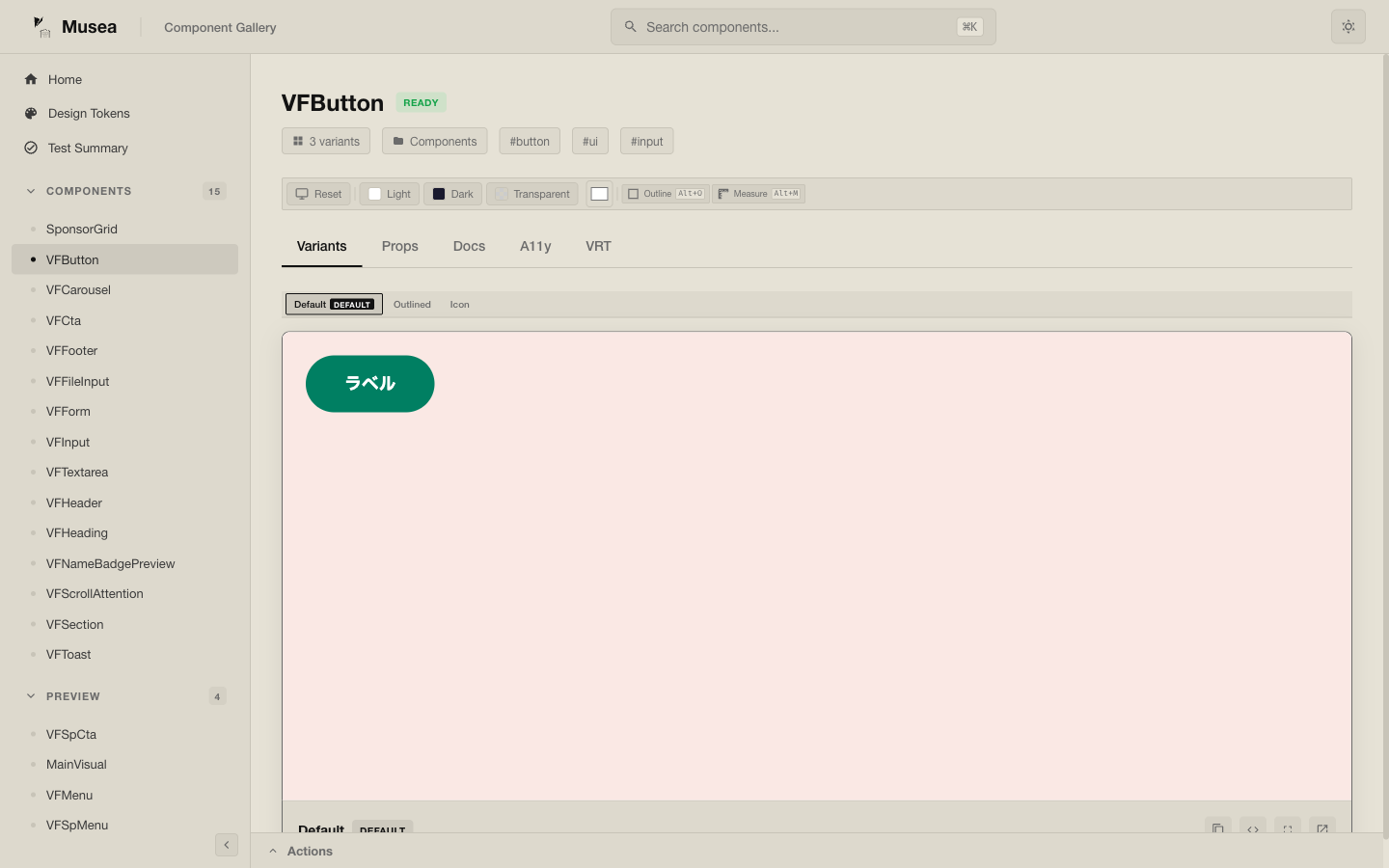
Musea can surface:
- component and variant metadata
- prop palette generation
- design token views
- accessibility checks
- visual regression testing helpers
- Storybook-compatible output when requested
Interaction Tests
Musea supports fully typed inline play functions, a fast browser runner, rich traces, and
Vitest registration. See Musea interaction testing for the complete API,
CLI workflow, execution model, and component-input contract.
Props Palette
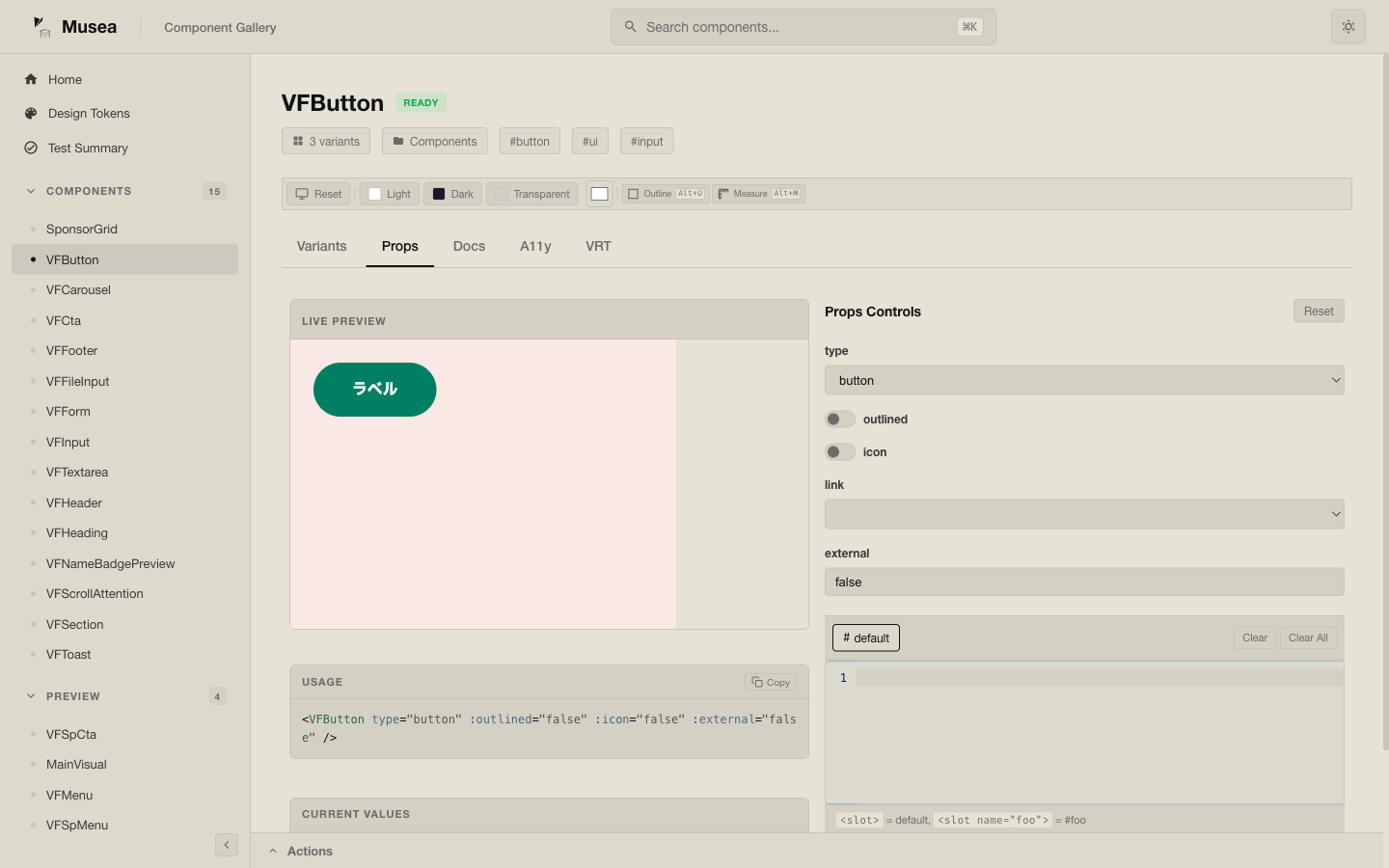
The palette pipeline infers interactive controls from component metadata and the target bindings.
Choose a variant in the Props header to load its preview and use its authored component props as
the initial control values. Fallthrough attrs are passed separately. Saved or shared values still
take precedence, and Reset returns to the selected variant's authored values. The older args
spelling remains readable for migration.
Typed defineProps and runtime object/array declarations use native SFC metadata. String,
number, boolean, array, and object defaults retain their JSON types; authored variant values take
precedence. Static object and array factories are read without executing project code. Functions
and defaults that depend on executable expressions remain owned by the component: Controls does
not invent a replacement value or execute the expression. Function props are read-only.
The public analyzeSfc(source, { filename, profile: true }) native API reports props, emits, and
optional phase timings (descriptorParseNs, analyzeNs, defaultProjectionNs, serializeNs)
with actual call counts, including literalMemberParseCalls for exotic typed member syntax (zero
for ASCII members and cache hits). serializeNs covers construction of the Rust JSON result, excluding the
N-API conversion and optional profile envelope. A bounded cache reuses metadata only for the exact
filename and source; edits invalidate the entry. Use { cache: false, profile: true } for cold
measurements. Unsupported defaults have unsupported_default: true and their authored
default_source, without a fabricated default_value.
Use Copy link in Props Controls to share the current values, custom controls, removed props, and slot content. Opening the link selects the Props tab and restores that snapshot in the preview, including in a fresh browser. Explicit URL state takes precedence over saved local values. Reset restores the current component defaults and removes the shared state from the URL while preserving other query parameters and the variant fragment.
Links contain a versioned JSON snapshot for the selected Art file. Slot content is rendered as literal text. DOM HTML and event handler props, non-JSON values, and states larger than 24,000 encoded characters cannot be shared. Invalid links show an error and retain the normal local or default state; no snapshot is partially applied. Share only values suitable for a public URL.
Vue 3.5.41 does not apply a component prop literally named __proto__. Preserving that raw key in
editor data does not prove that a preview applies it. Avoid this prop name;
#8533 tracks explicit editor refusal and release
acceptance.
Design Tokens
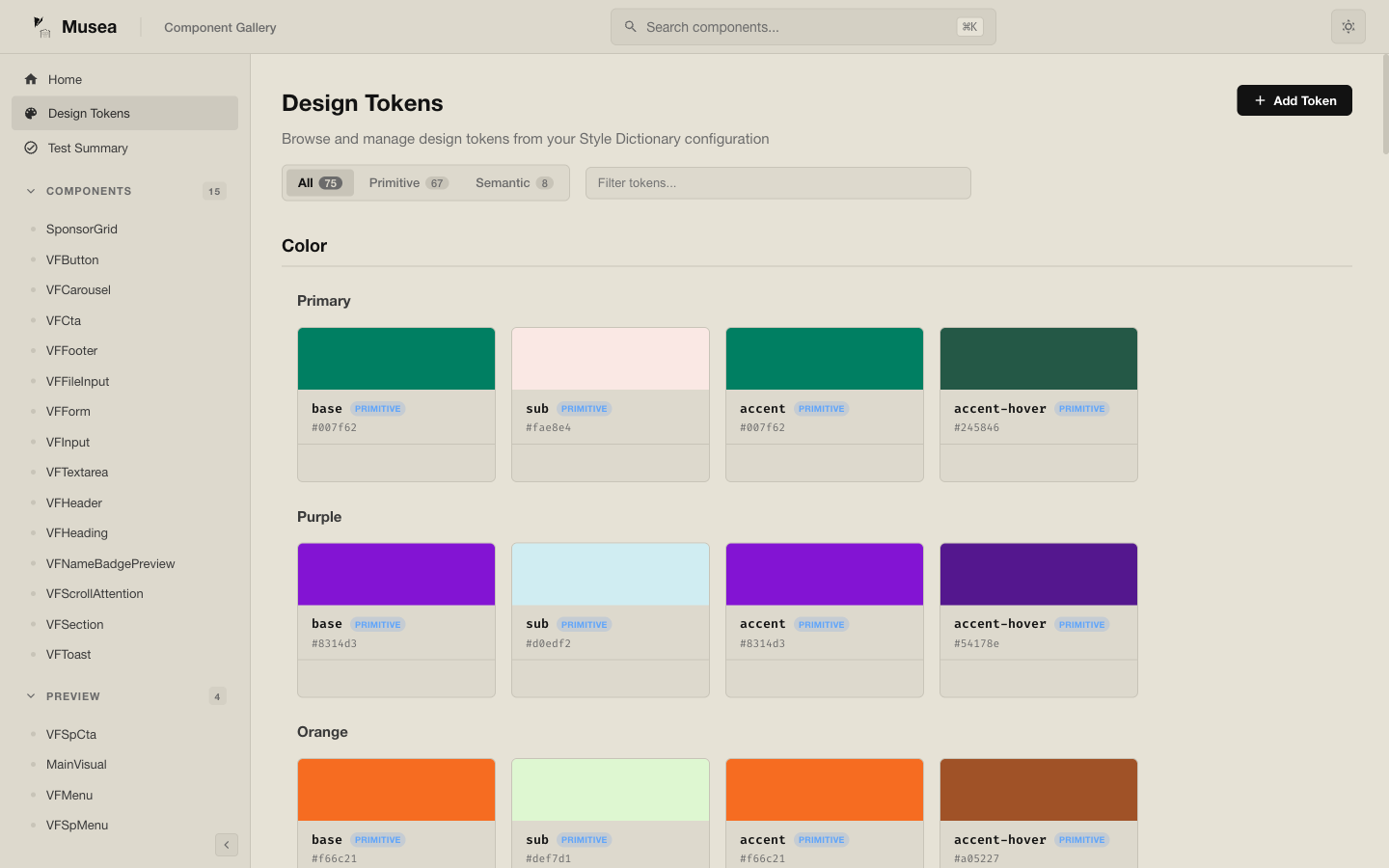
@vizejs/vite-plugin-musea can ingest a Style Dictionary-compatible token file and expose it in
the gallery UI.
musea({
  tokensPath: "src/tokens.json",
});
Preview Configuration
You can inject project CSS and preview setup code:
musea({
  previewCss: ["src/styles/main.css", "src/styles/musea-preview.css"],
  previewSetup: "musea.preview.ts",
});
Install preview plugins or add global brand, theme and locale controls.
// musea.preview.ts
import type { App } from "vue";
import { createI18n } from "vue-i18n";

export default function setup(app: App) {
  app.use(
    createI18n({
      legacy: false,
      locale: "en",
      messages: {
        en: {},
      },
    }),
  );
}
Visual Regression Testing
The package exposes the musea-vrt binary. See capture settings and accessibility details for animation controls and per-node reports:
vp exec musea-vrt --base-url http://localhost:5173
vp exec musea-vrt --update
vp exec musea-vrt --ci --json
vp exec musea-vrt --a11y
vp exec musea-vrt approve
vp exec musea-vrt approve "Button/*"
vp exec musea-vrt clean
Typical CI flow starts the Vite server in one process, then runs the snapshot command against it:
vp dev --host 0.0.0.0
vp exec musea-vrt --base-url http://localhost:5173 --ci --json
The workflow: commit baselines under the snapshot directory, run musea-vrt --ci --json against a
running dev server, then inspect vrt-report.json/vrt-report.html plus snapshots/current and
snapshots/diff on failure. Re-run with --update (or approve for selected variants) for
intentional changes, and run clean after removing art files so stale baselines do not hide gaps.
--ci exits non-zero for visual diffs and for preview/capture errors (missing route, browser
failure, selector timeout); new baselines are reported as new, so run --update locally first.
The example app also wires the Playwright-native VRT path (examples/vite-musea, run via
vp run test:vrt / vp run test:vrt:update). Snapshots live in e2e/vrt/__snapshots__, failure
artifacts in e2e/vrt/test-results, and the HTML report in playwright-report; GitHub Actions
uploads them on failure so reviewers can inspect the baseline, current, and diff images.
Generate Art Files
Use the generator to create a first .art.vue draft from an existing component:
vp exec musea-vrt generate src/components/Button.vue
The generated file is a starting point. Review the variants, titles, tags, and prop coverage before committing it.
Storybook Output
Enable Storybook-compatible CSF generation when you want Musea art files to feed a Storybook setup:
musea({
  storybookCompat: true,
  storybookOutDir: ".storybook/stories",
});
CLI Status
vize musea exists in the Rust CLI, but the recommended Musea workflow today is still the Vite
plugin path. Treat the Rust subcommand as experimental while the dedicated gallery workflow settles.
The Rust subcommand can scaffold a starter art project:
vize musea new
Related Packages
@vizejs/vite-plugin-musea@vizejs/musea-mcp-servervize_musea